Competitor price monitoring across online stores
Keep competitor prices, promotions and product availability current across the stores that matter to your business. Web Scraper Cloud runs recurring jobs and delivers dated datasets to your pricing, reporting and storage workflows.
Who competitor price monitoring is for
Price monitoring is useful for teams that need to follow the same products across several stores without relying on manual checks or isolated snapshots.
| Who it is for | What they monitor | Risk of outdated data |
|---|---|---|
| Pricing teams | Matched competitor prices and promotions | Missing a price reduction or promotion until the next manual review |
| Category managers | Price position, stock and assortment by category | Making category decisions with an incomplete view of the market |
| E-commerce managers | Key products before campaigns and promotions | Launching a campaign against an outdated competitor price |
| Data and BI teams | Dated price and availability snapshots | Publishing stale reports or creating gaps in price history |
A typical competitor price monitoring workflow
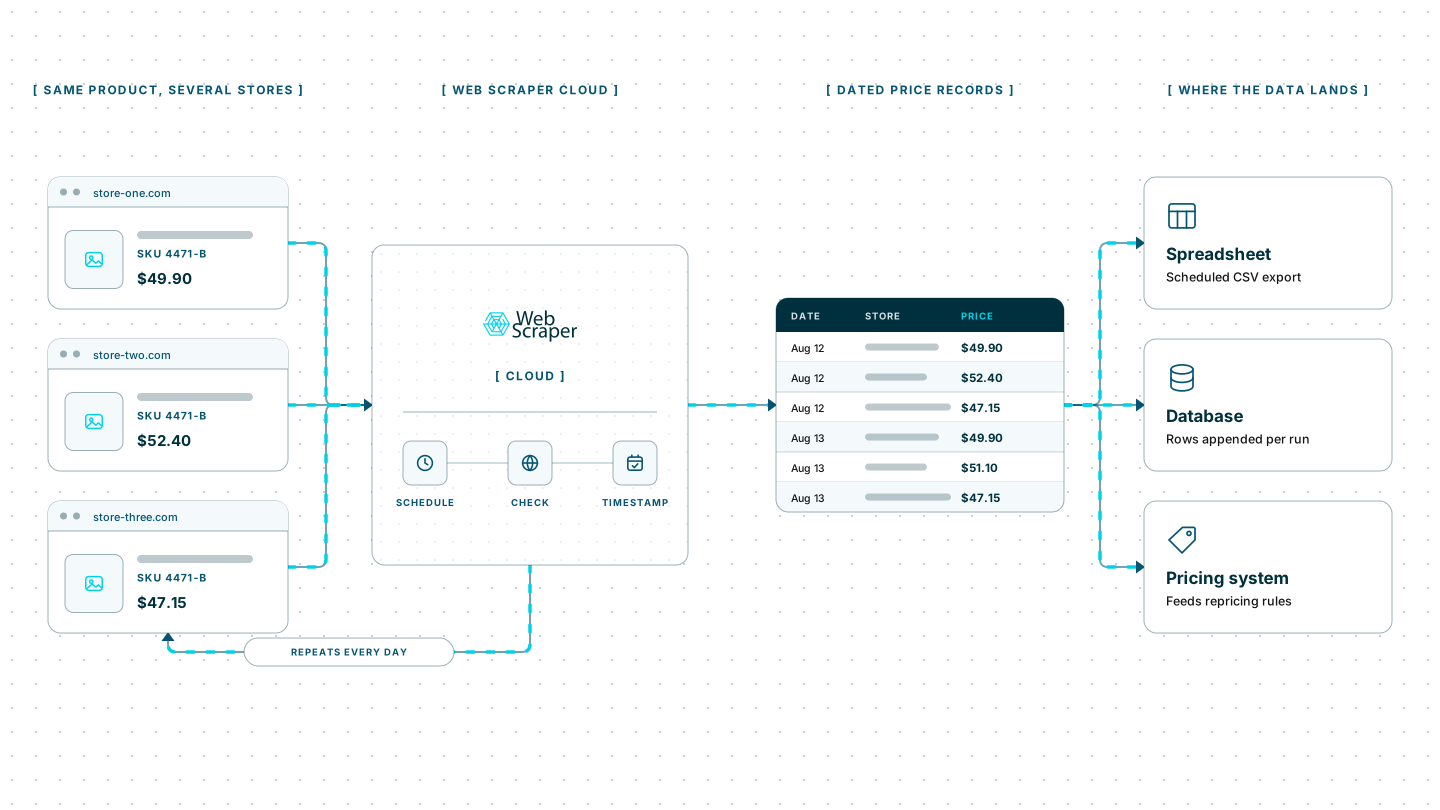
A home-appliance retailer follows 500 matched products across four competitor stores. For each product, it captures the product name, model number, current price, promotion label, availability, source URL and collection time.
Web Scraper Cloud runs the jobs every morning and sends the completed data to the retailer’s storage environment. The retailer’s own system matches equivalent products, compares the latest file with the previous run and sends material changes to the pricing team.
Web Scraper handles recurring website extraction and delivery. Product matching, pricing rules and commercial decisions remain part of the retailer’s own workflow.
Built for the realities of retail price monitoring
Retail prices may load through JavaScript, change by location or variant, and sit behind pagination, clicks or infinite scrolling. Stores can also apply rate limits, IP blocks, CAPTCHAs and anti-bot systems such as Cloudflare, DataDome and PerimeterX.
Teams need to assemble and maintain headless browsers, a proxy pool, CAPTCHA solving, retry logic, scheduling and monitoring. When a retailer changes its page structure, JavaScript behavior or access protections, the affected scraper may need further work before price monitoring can continue reliably.
Web Scraper Cloud provides that infrastructure as a managed service, combining browser automation, built-in proxy management, automated CAPTCHA handling and retries. It removes the need to operate separate browser, proxy and scheduling systems for every recurring monitoring project. Teams can manage product coverage and collection frequency while Web Scraper Cloud runs and delivers the jobs.
Coverage across major retailers and storefronts
The Web Scraper Marketplace includes prebuilt sitemaps for Amazon, eBay, ASOS, Walmart and other major retailers, providing a ready-made starting point for common targets.
Web Scraper can also be configured for public storefronts built with Shopify, WooCommerce, Adobe Commerce, BigCommerce and custom e-commerce systems.
Unusual page structures, location settings or access protections may require additional sitemap or Cloud configuration.
The free trial is the fastest way to set up the stores and products you need to monitor, run the first jobs and confirm that the required price fields are reaching your workflow.
Where Web Scraper fits
Web Scraper provides the recurring extraction layer between competitor stores and the pricing systems your team already uses.
Define the monitoring scope
Use the Web Scraper browser extension to create a sitemap for each store. Select the product identifier, price, promotion, availability and source URL required in the output.
Run recurring jobs in Web Scraper Cloud
Web Scraper Cloud handles scheduled execution, browser automation, proxies, retries and job monitoring across your target stores.
Jobs can run at fixed intervals or through custom schedules, allowing teams to refresh pricing datasets without repeating the same manual checks. Explore scheduled scraping.
Connect the results to your existing tools
Download completed data as CSV, XLSX or JSON, or send it to Google Sheets, Google Drive, Dropbox, Google Cloud, Azure or Amazon S3.
The Web Scraper Cloud API can connect job execution and data retrieval to pricing systems, reporting environments and internal pipelines. Webhooks notify those systems when a job has finished. View data export options.
curl "https://api.webscraper.io/api/v1/scraping-job/{job_id}/json" -H "Authorization: Bearer {token}"

{
  "product_name": "60 cm induction hob",
  "model_number": "AC-IH60-B",
  "price": "429.00",
  "promotion": "Autumn offer",
  "availability": "in_stock",
  "source_url": "https://store-one.example.com/hobs/ac-ih60-b",
  "collected_at": "2026-08-17T06:00:11Z"
}
{...}Ready-made sitemaps for major retailers
Start from a prebuilt retailer sitemap and adjust it to the stores, products and price fields you monitor.
Replace manual price checks with scheduled monitoring
Move recurring competitor checks into scheduled jobs and deliver each completed dataset to the systems your pricing team already uses. Start with the products and stores that influence the most decisions, then expand coverage as the workflow proves useful.