Market research web scraping for current market data
Track market participants, product coverage, regional availability and competitor positioning across the public websites relevant to a defined research question. Web Scraper Cloud runs recurring jobs and delivers structured observations to research, strategy and competitive-intelligence workflows.
Who market research web scraping is for
Public market evidence is spread across company sites, catalogs, directories, listings and regional pages. Market research web scraping is useful when a team has a defined question and needs to compare the same signals across a known set of sources or over several research periods.
| Who it is for | What they need | Risk of incomplete or outdated data |
|---|---|---|
| Strategy and corporate-development teams | Market participants, category coverage and regional presence | Missing a new entrant, expansion move or gap in the selected market |
| Product and category teams | Competitor ranges, positioning and changes across markets | Prioritizing a category using stale assortment or availability evidence |
| Investment and research teams | Traceable public operating signals across a fixed source universe | Mistaking a source failure or website redesign for a market change |
| Data and competitive-intelligence teams | Repeatable observations tied to entities, sources and dates | Comparing manually compiled records that use inconsistent definitions |
A typical market research workflow
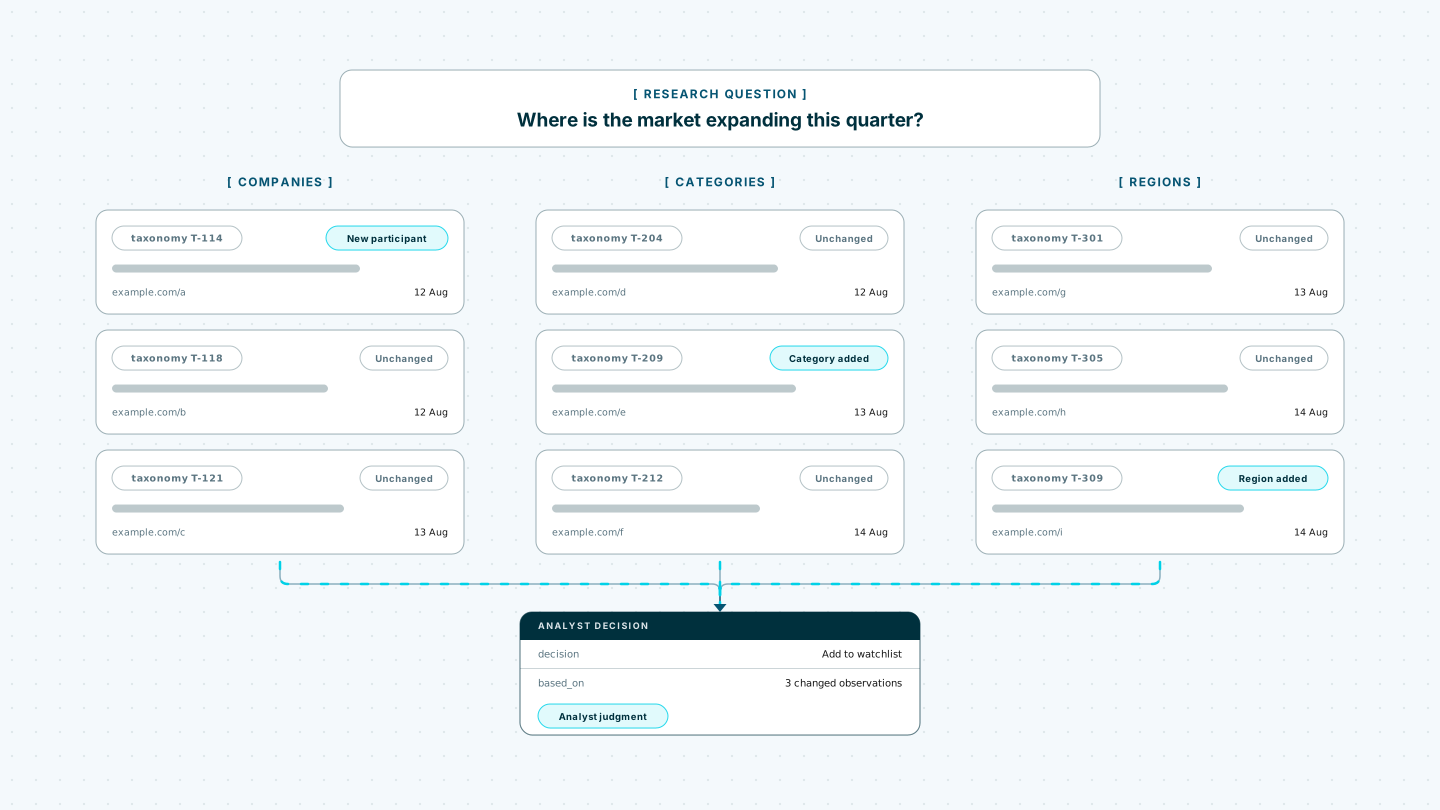
A packaging manufacturer is assessing the sustainable food-packaging category in four European markets. Its research team defines a source universe of 120 manufacturer and distributor websites and runs a quarterly collection. Each observation contains the company, country, market role, source category label, material, stated application, regional availability, source URL and observation date.
When the jobs finish, the company’s research pipeline maps source labels to an approved category taxonomy while retaining the original wording. It compares the latest observations with earlier runs and flags new market participants, category additions, regional expansion and disappearing signals for analyst review. A change shared by several sites using the same template is checked as a possible extraction issue before it enters the market model.
Web Scraper handles recurring website extraction and delivery. The research question, source selection, taxonomy, entity matching, interpretation and commercial decisions remain part of the customer’s own workflow. The resulting dataset describes the selected public sources and should not be presented as a statistically representative estimate of the whole market unless the research method supports that conclusion.
Built for research across changing websites
Market research often combines websites that were never designed to be compared. One source may organize offerings by product category, another by application and another by region. Relevant evidence can sit behind pagination, filters, location selectors or JavaScript-rendered pages. A blank field may mean that a signal is absent, that the page changed or that the extraction path failed.
Running this work in-house means maintaining headless browsers, a proxy pool, CAPTCHA handling, retry logic, scheduling and monitoring across many unrelated site structures. When a company changes its navigation, catalog template or regional page, the affected sitemap needs to be identified and updated before the next research cycle.
Web Scraper Cloud provides the execution infrastructure as a managed service, combining browser automation, built-in proxy management, automated CAPTCHA handling and retries. Teams can keep control of the research model and source coverage while Web Scraper Cloud runs the jobs and delivers the completed observations.
Coverage across public market sources
Web Scraper can be configured for public company sites, product and service catalogs, industry directories, dealer locators, job boards and listing platforms built with static HTML, JavaScript frameworks or custom systems.
Separate sitemaps can reflect different source structures while producing a shared output model. Raw source labels, page URLs and observation dates can remain attached to each signal so analysts can trace a comparison back to the page on which it appeared.
Unusual search interfaces, location settings, page interactions or access protections may require additional sitemap or Cloud configuration.
The free trial is the fastest way to configure a representative source sample, run the first dataset and confirm that its records fit the research taxonomy before expanding coverage.
Where Web Scraper fits
Web Scraper provides the recurring website-extraction layer between selected public sources and the systems used to compare, validate and analyze market observations.
Define the source and signal coverage
Use the Web Scraper browser extension to create a sitemap for each source pattern. Define the navigation path and select the entity, signal, source and date fields required by the research model.
Run recurring jobs in Web Scraper Cloud
Web Scraper Cloud handles scheduled execution, browser automation, proxies, retries and job monitoring across the selected market sources.
Source groups can run monthly, quarterly or on custom schedules, allowing teams to compare consistent research periods without rebuilding the same collection. Explore scheduled scraping.
Connect observations to research systems
Download completed data as CSV, XLSX or JSON, or send it to Google Sheets, Google Drive, Dropbox, Google Cloud, Azure or Amazon S3.
Use the Web Scraper Cloud API when completed jobs need to enter a research database, validation queue or internal analysis pipeline. Webhooks notify those systems when a run has finished. View data export options.
curl "https://api.webscraper.io/api/v1/scraping-job/{job_id}/json" -H "Authorization: Bearer {token}"

{
  "entity": "Nordwerk Packaging",
  "signal": "product_range",
  "value": "Compostable food trays",
  "category": "Sustainable packaging",
  "region": "DACH",
  "source_url": "https://nordwerk.example.com/products",
  "observed_at": "2026-08-17T06:00:11Z"
}
{...}Ready-made sitemaps for company and review sources
Start from a prebuilt sitemap for a public company source, then adjust it to the entities and signals in your research model.
Replace repeated source checks with current market evidence
Move recurring company, catalog and directory checks into scheduled extraction jobs, with every signal tied to its source and observation date. Start with one research question and a representative source set, then expand once the taxonomy and validation process are working as intended.