Web data for RAG systems and AI agents
Keep the website content used by your retrieval system current. Web Scraper Cloud runs recurring jobs across the sources you select and delivers completed datasets to your downstream ingestion pipeline.
Who web data for RAG and AI agents is for
This workflow is useful for teams whose retrieval system depends on information published across external documentation, help centers, release notes or other public websites.
| Who it is for | What they need | Risk of outdated data |
|---|---|---|
| AI application teams | Current content from selected website sources | Returning an answer based on an outdated source page |
| Data and platform engineers | Repeatable jobs and completion signals | Sending incomplete or inconsistently refreshed data into ingestion |
| Knowledge and product teams | Control over source and page-type coverage | Leaving a vendor, section or page type outside the retrieval corpus |
| Data governance teams | Source URLs and reviewable records | Indexing content without a traceable source or review point |
A typical RAG data workflow
A software company is building a support assistant that uses documentation and release notes from 25 vendor websites. Each weekly run captures the page URL, title and selected article content from every source.
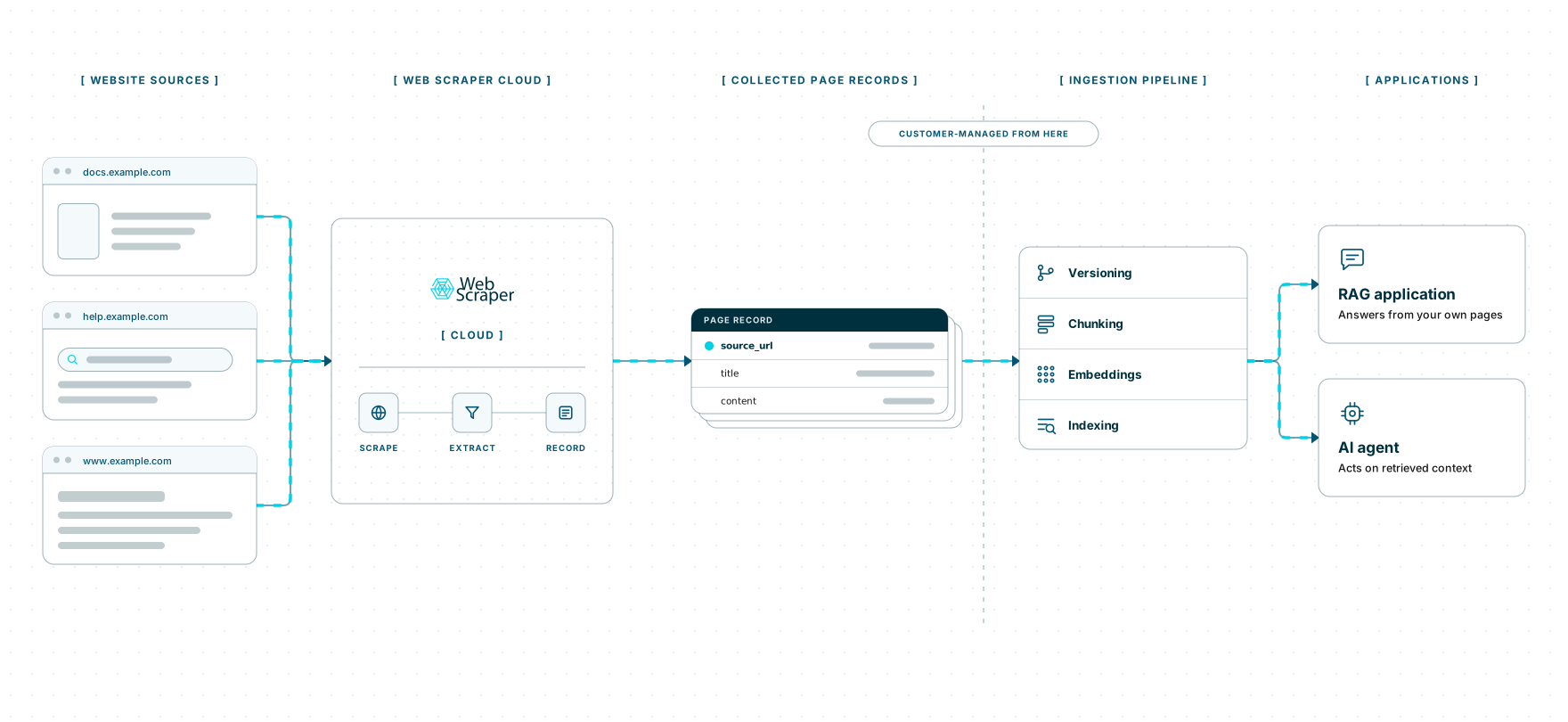
When a job finishes, a webhook notifies the company’s ingestion service. That service compares the new records with earlier versions, handles removals, splits the content into chunks, creates embeddings and updates the retrieval index.
Web Scraper handles recurring website extraction and delivery. Document identity, change detection, chunking, embeddings, the vector database and the agent remain part of the customer’s ingestion and application stack.
Built for changing website sources
Documentation and help sites can render content through JavaScript, divide articles across different page types, hide sections behind interactions or extend across pagination. Sources can also apply rate limits, IP blocks, CAPTCHAs and anti-bot protections.
Teams need to assemble and maintain headless browsers, a proxy pool, CAPTCHA solving, retry logic, scheduling and monitoring. When a source changes its page structure, JavaScript behavior or access protections, the affected scraper may need further work before collection can continue reliably.
Web Scraper Cloud provides that infrastructure as a managed service, combining browser automation, built-in proxy management, automated CAPTCHA handling and retries. It removes the need to operate separate browser, proxy and scheduling systems for every recurring source-collection project. Teams can manage source coverage and extraction rules while Web Scraper Cloud runs and delivers the jobs.
Coverage across documentation and knowledge sources
Web Scraper can be configured for public documentation, help-center, release-note and knowledge-base pages built with static HTML, JavaScript frameworks or custom systems.
A sitemap can follow links between sections and page types while retaining the page title, source URL and selected article content required by the ingestion pipeline.
Unusual page structures, interaction patterns or access protections may require additional sitemap or Cloud configuration.
The free trial is the fastest way to set up representative pages from each source, run the first jobs and confirm that the required content is reaching your ingestion workflow.
Where Web Scraper fits
Web Scraper provides the recurring website-extraction layer before the customer-managed ingestion, indexing and retrieval stack.
Define the website sources
Use the Web Scraper browser extension to create a sitemap for each source. Select the page title, source URL and relevant content while excluding navigation and repeated page furniture.
Run recurring jobs in Web Scraper Cloud
Web Scraper Cloud handles scheduled execution, browser automation, proxies, retries and job monitoring across the selected sources.
Jobs can run at fixed intervals or through custom schedules, allowing teams to refresh source datasets without repeating the same manual checks. Explore scheduled scraping.
Hand completed jobs to the ingestion pipeline
Download completed data as CSV, XLSX or JSON, or send it to Google Sheets, Google Drive, Dropbox, Google Cloud, Azure or Amazon S3.
Use the Web Scraper Cloud API when completed jobs need to enter a customer-managed ingestion service. Webhooks notify that service when a job has finished. View data export options.
curl "https://api.webscraper.io/api/v1/scraping-job/{job_id}/json" -H "Authorization: Bearer {token}"

{
  "page_title": "Configure SSO",
  "section": "Authentication",
  "source_url": "https://docs.example.com/sso",
  "content": "Single sign-on requires an identity provider that supports SAML 2.0...",
  "retrieved_at": "2026-08-17T06:00:11Z"
}
{...}Ready-made sitemaps for public source sites
Documentation and help centers are usually custom sources. Start from a prebuilt sitemap for a comparable source type, or build your own with the browser extension.
Replace manual source updates with scheduled web datasets
Move recurring source collection into scheduled jobs and deliver each completed dataset to the ingestion systems your team already uses. Start with the sources most important to retrieval quality, then expand coverage as the workflow proves useful.