Lead generation web scraping for public business data
Build current lists of companies and locations from the public directories, company pages and industry platforms relevant to your market. Web Scraper Cloud runs recurring jobs and delivers structured records to account research, territory planning and CRM workflows.
Who lead generation web scraping is for
Public business data is spread across category pages, location listings, company profiles and contact pages. Lead generation web scraping is useful for teams that have defined their target account segment and need a repeatable way to build or refresh the supporting business records.
| Who it is for | What they need | Risk of incomplete or outdated data |
|---|---|---|
| Sales operations and revenue operations teams | Target-account coverage by industry, location and company type | Missing new accounts or routing the wrong branch into a territory |
| SDR, BDR and account-research teams | Current company profiles and public business contact channels | Spending time on closed, duplicated or out-of-segment businesses |
| Agencies and business-data teams | Repeatable client-specific datasets with consistent source fields | Delivering duplicate locations, stale domains or records without traceable sources |
| Market development and territory teams | Business and location coverage across selected categories and regions | Planning expansion with a category or regional blind spot |
A typical lead generation data workflow
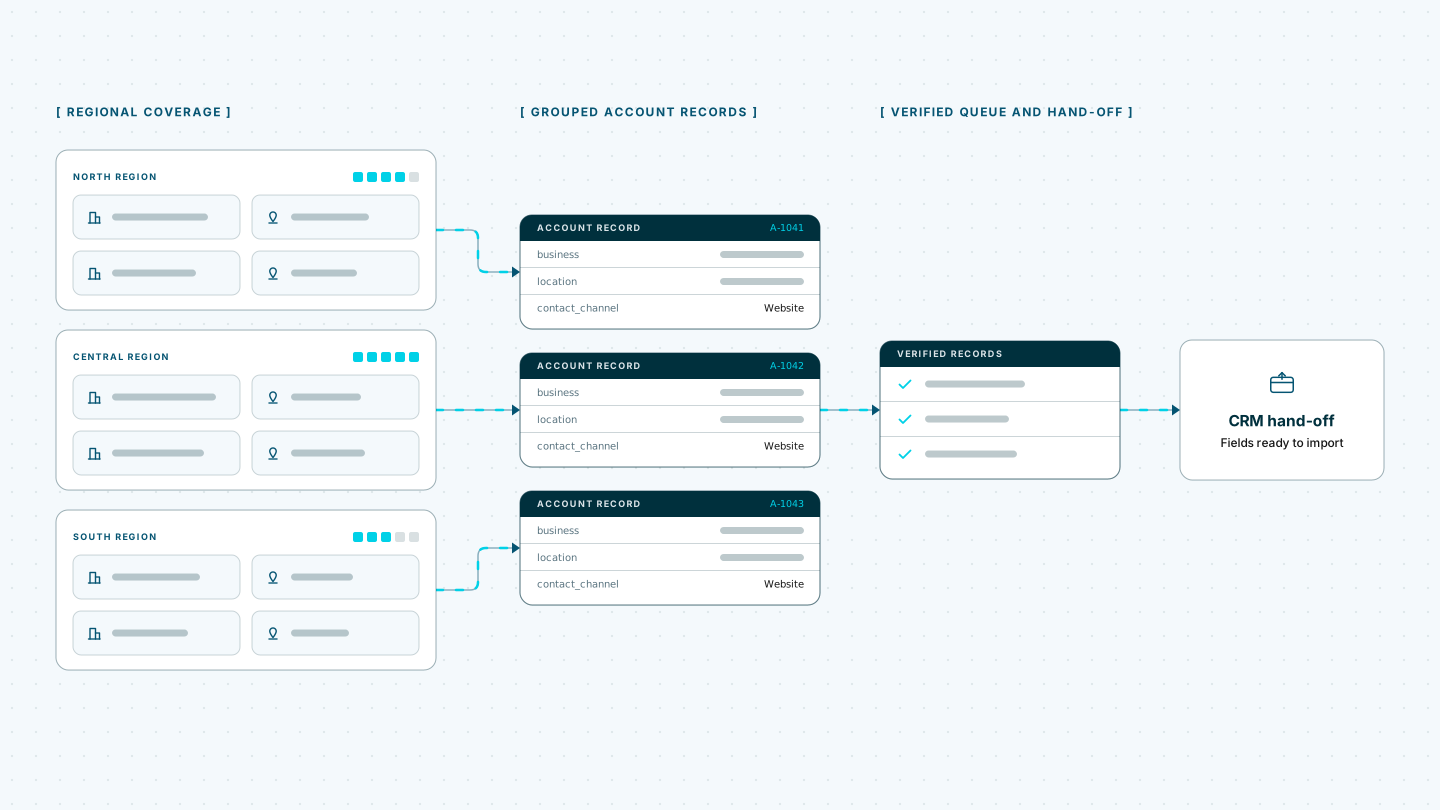
A B2B equipment supplier is expanding into six regional markets. Its sales-operations team follows 20 approved industry directories, association listings and supplier databases. Each weekly run captures the business name, website domain, category, location, service area, public business phone, role-based contact channel where published, source URL and observation date.
When a job finishes, a webhook notifies the company’s account-data pipeline. That system separates businesses from locations, deduplicates records using domain, source ID and address evidence, checks segment eligibility and compares the latest observations with earlier runs. New or changed records enter a verification queue before approved updates are sent to the CRM.
Web Scraper handles recurring website extraction and delivery. Source approval, legal and compliance review, identity matching, contact verification, enrichment, lead scoring, CRM assignment and outreach remain part of the customer’s own workflow. Social-network and private-account data are outside this workflow.
Built for changing business directories
Business directories and listing platforms can spread records across category filters, location searches, pagination and company detail pages. Domains or public contact channels may appear only on the detail page or after a supported interaction, while JavaScript can control results and navigation. Sources can also apply rate limits, IP blocks, CAPTCHAs and anti-bot protections.
Running recurring collection in-house means maintaining headless browsers, a proxy pool, CAPTCHA handling, retry logic, scheduling and monitoring across every source. Changes to pagination, category paths, company templates or location records can create further maintenance work before the next refresh.
Web Scraper Cloud provides that execution infrastructure as a managed service, combining browser automation, built-in proxy management, automated CAPTCHA handling and retries. Teams can manage target coverage and extraction rules while Web Scraper Cloud runs the jobs and delivers the completed records.
Coverage across public business sources
Web Scraper can be configured for public industry directories, association member lists, dealer or supplier locators, local business listings and company or branch pages built with static HTML, JavaScript frameworks or custom systems.
A sitemap can move through categories and locations, follow company links and retain separate business, location and public contact-channel fields. Source IDs, URLs and observation dates can stay attached to each record so stale or uncertain entries can be reviewed instead of silently merged.
Unusual search interfaces, interaction patterns, page structures or access protections may require additional sitemap or Cloud configuration.
The free trial is the fastest way to configure representative sources, run the first account sample and confirm that the required business records reach your downstream workflow.
Where Web Scraper fits
Web Scraper provides the recurring website-extraction layer between public business sources and the systems your team uses for verification, account management and market development.
Define the account and source coverage
Use the Web Scraper browser extension to create a sitemap for each source. Define category and location paths, follow company pages and select only the business fields required in the output.
Run recurring jobs in Web Scraper Cloud
Web Scraper Cloud handles scheduled execution, browser automation, proxies, retries and job monitoring across the selected directories and company sites.
Jobs can run at fixed intervals or through custom schedules, allowing teams to refresh business records without repeating manual directory checks. Explore scheduled scraping.
Connect completed jobs to account-data systems
Download completed data as CSV, XLSX or JSON, or send it to Google Sheets, Google Drive, Dropbox, Google Cloud, Azure or Amazon S3.
Use the Web Scraper Cloud API when completed jobs need to enter a verification service, CRM staging area or internal data pipeline. Webhooks notify those systems when a run has finished. View data export options.
curl "https://api.webscraper.io/api/v1/scraping-job/{job_id}/json" -H "Authorization: Bearer {token}"

{
  "business": "Baltic Machine Works",
  "location": "Riga, LV",
  "industry": "Industrial equipment",
  "contact_page": "https://baltic-machine.example.com/contact",
  "directory_category": "Metalworking machinery",
  "source_url": "https://directory.example.com/baltic-machine-works",
  "observed_at": "2026-08-17T06:00:11Z"
}
{...}Ready-made sitemaps for business directories
Start from a prebuilt directory sitemap and adjust it to the categories, locations and business fields your team works with.
Turn recurring account research into structured business datasets
Move selected directory and company-site checks into scheduled extraction jobs and deliver each completed dataset to the systems your team already uses. Start with one defined account segment and expand coverage after the identity, verification and suppression rules are working as intended.