MAP monitoring for advertised-price review
Track public advertised prices across the retailer and marketplace pages relevant to your channel program. Web Scraper Cloud runs recurring jobs and delivers product, seller, promotion and source evidence to your minimum advertised price review workflow.
Who MAP monitoring is for
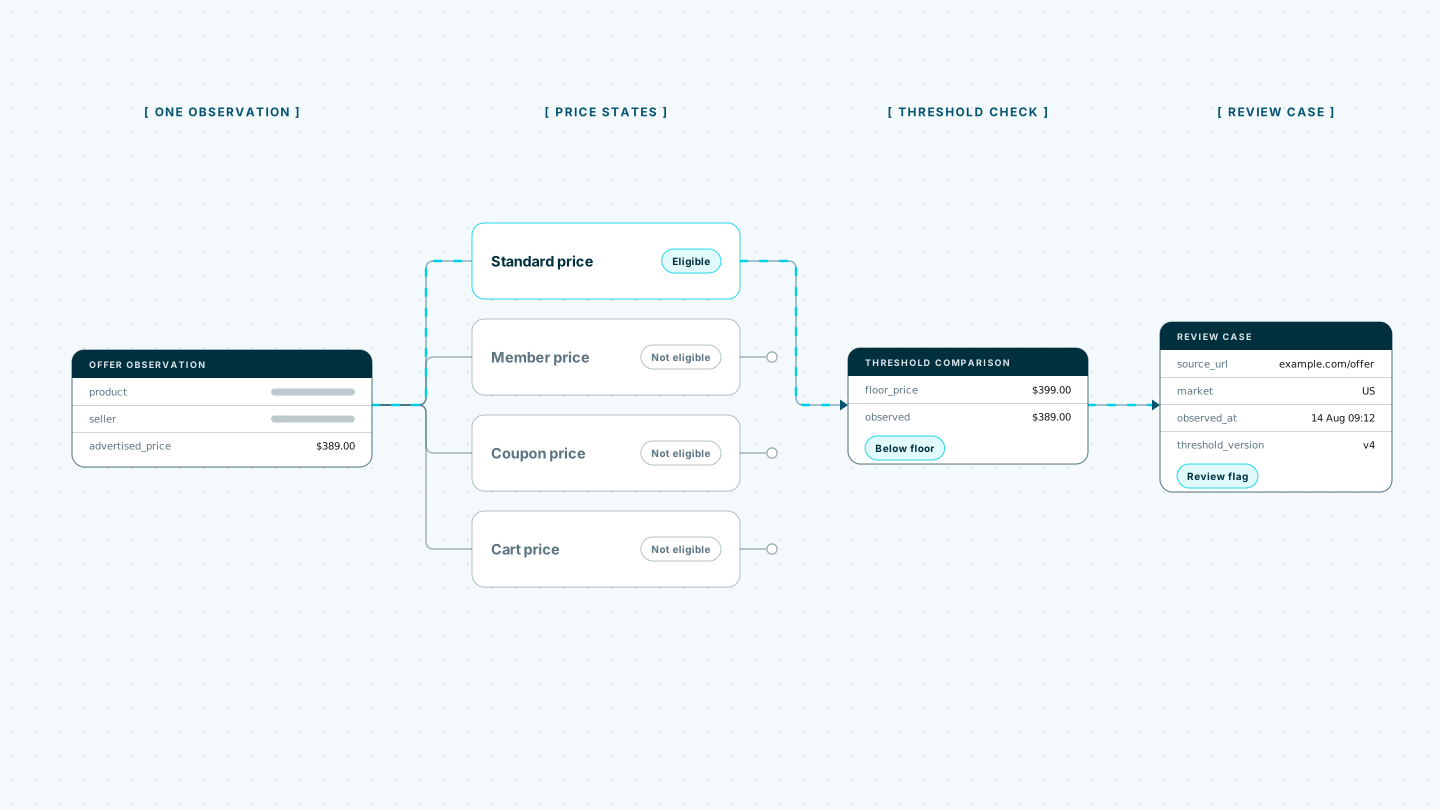
A useful MAP review record needs more than a product and a low number. The seller, price type, promotion conditions, market, source URL and observation time determine what was publicly advertised and whether the record is ready for review.
| Who it is for | What they need | Risk of incomplete or outdated data |
|---|---|---|
| Brand and channel teams | Advertised-price observations across selected retailers and marketplaces | Missing a recent below-threshold offer or acting on evidence that is already stale |
| Reseller-management teams | Seller-level records connected to products, offers and source pages | Attributing an offer to the wrong seller or overlooking repeated seller patterns |
| E-commerce and commercial teams | Comparable public price states across products, variants and markets | Treating a member, coupon or cart price as an ordinary advertised price |
| Data and review-operations teams | Traceable evidence with the threshold and conditions used for each flag | Sending incomplete records into review without the source context needed to assess them |
A typical MAP monitoring workflow
A consumer-electronics brand reviews advertised prices for 75 products across 40 approved retailer and marketplace sources each morning. Every observation includes the product identifier and variant, seller, advertised price, visible price type, promotion label, market, source URL and timestamp. Marketplace offer lists produce separate seller-level records rather than one record for the leading offer.
When the jobs finish, the brand’s review system verifies the product and seller match, checks whether the amount is an eligible advertised price and applies the threshold that was effective at the observation time. Records below the supplied threshold enter a review queue with the original page evidence. Member, coupon and cart prices remain separate unless the brand’s approved comparison rule includes them.
Web Scraper handles recurring website extraction and delivery. Product mappings, threshold values, price-eligibility rules, policy interpretation, seller-authorization decisions, legal assessment and enforcement remain part of the customer’s own workflow. A threshold flag is an observation for human review, not a finding that a seller has violated a policy.
Built for the way advertised prices appear online
Retail and marketplace pages can show list prices, sale prices, member amounts, coupon offers, cart prices and time-limited promotions in the same product view. Variants may have different prices, seller offers may sit behind expandable lists and JavaScript can change the page after a location or product option is selected. Sources can also apply rate limits, IP blocks, CAPTCHAs and anti-bot protections.
Running recurring monitoring in-house means maintaining headless browsers, a proxy pool, CAPTCHA handling, retry logic, scheduling and monitoring across each source. Changes to seller-offer lists, price labels, variant controls or promotion components can require further maintenance before the next review cycle.
Web Scraper Cloud provides the execution infrastructure as a managed service, combining browser automation, built-in proxy management, automated CAPTCHA handling and retries. Teams can manage products, source coverage and extraction rules while Web Scraper Cloud runs the jobs and delivers the completed observations.
Coverage across public retailer and marketplace pages
Web Scraper can be configured for public retailer product pages, category pages, marketplace seller-offer lists and dealer sites built with static HTML, JavaScript frameworks or custom e-commerce systems.
A sitemap can follow product and variant pages, expand seller offers and retain visible promotion conditions alongside each price. Source URLs, markets and timestamps stay attached to the observation so a reviewer can return to the evidence rather than assess an isolated number.
Unusual price states, location settings, seller-list interactions or access protections may require additional sitemap or Cloud configuration.
The free trial is the fastest way to configure representative products and offer types, run the first observation set and confirm that complete evidence reaches the review workflow.
Where Web Scraper fits
Web Scraper provides the recurring website-extraction layer between public retailer and marketplace pages and the systems used to apply supplied thresholds and manage human review.
Define the product, seller and price states
Use the Web Scraper browser extension to create a sitemap for each source pattern. Follow the required product, variant and seller paths, then select the advertised price and visible conditions required in the output.
Run recurring jobs in Web Scraper Cloud
Web Scraper Cloud handles scheduled execution, browser automation, proxies, retries and job monitoring across the selected retailer and marketplace sources.
Jobs can run daily, weekly or through custom schedules, allowing teams to refresh advertised-price observations without repeating manual store checks. Explore scheduled scraping.
Connect observations to the review process
Download completed data as CSV, XLSX or JSON, or send it to Google Sheets, Google Drive, Dropbox, Google Cloud, Azure or Amazon S3.
Use the Web Scraper Cloud API when completed jobs need to enter a product-matching service, threshold calculation or review queue. Webhooks notify those systems when a run has finished. View data export options.
curl "https://api.webscraper.io/api/v1/scraping-job/{job_id}/json" -H "Authorization: Bearer {token}"

{
  "product": "Model X300 headphones",
  "mpn": "X300-BLK",
  "seller": "SoundDepot",
  "advertised_price": "179.00",
  "price_type": "sale_price",
  "promotion": "Bundle discount",
  "market": "DE",
  "source_url": "https://retailer.example.de/x300-blk",
  "observed_at": "2026-08-17T06:00:11Z"
}
{...}Ready-made sitemaps for retailer and marketplace price pages
Start from a prebuilt sitemap for the sources you review, then add the seller, price type and promotion fields your MAP process needs.
Move advertised-price checks into a repeatable review workflow
Replace repeated retailer and marketplace checks with scheduled observations that retain the product, seller, price conditions, source and time. Start with a representative product set, current thresholds and clear review rules, then expand once the evidence and matching process are working as intended.