Click once selector
When to use it
The Click once selector clicks a single element on the page, so that the selectors after it can extract the content revealed by the click. Use it when a value becomes available only after one click, such as:
- Opening a tab or panel, for example a product specifications tab.
- Revealing contact details hidden behind a button, such as an email address or phone number.
Execution order
Place the Click once selector above the selectors that extract the revealed value, under the same parent. Selectors execute from top to bottom, so a selector placed above the click runs before the value is visible.
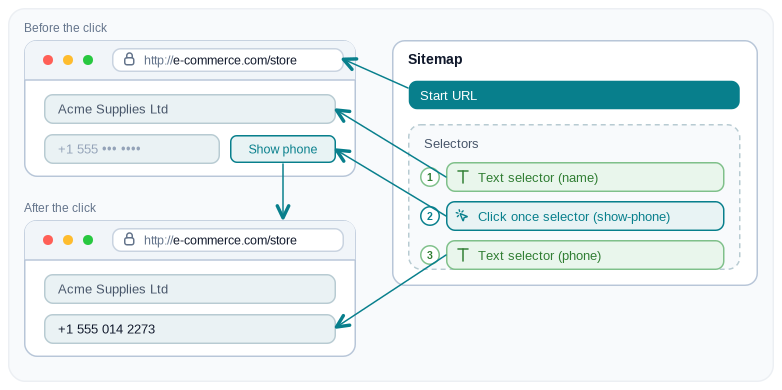
Click behavior
- Only the first element that matches the selector is clicked.
- If no element matches, the click is skipped and the remaining selectors still run. Pages without the button are scraped as usual.
Listing pages
To reveal contact details in each listing on a listing page, place the Click once selector inside an Element selector with Multiple enabled. The click is then performed once within each listing, above the selector that extracts the revealed value.
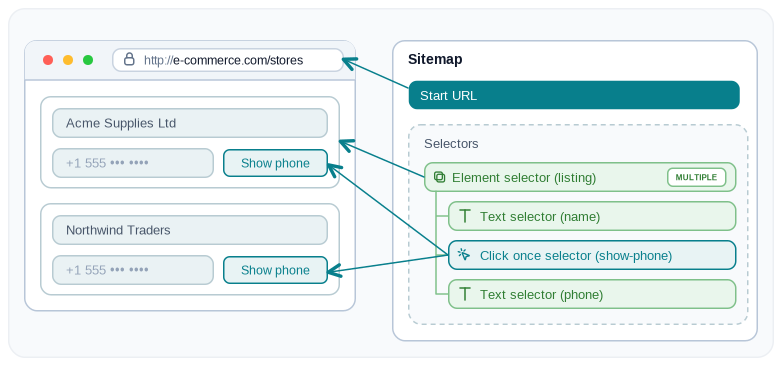
Test the click
The Click once selector has a Perform Action button in place of Data preview. Click Perform Action to run the click on the current page and check that the expected tab, panel or value appears. Reload the page before testing again, so the page returns to its original state.